DiffuseLogic is pleased to announce the public release of Bella 23.3, which supports the future Rhino 8 on both Windows and MacOS (supporting both Intel for
Rhino 6 & 7 and Apple Silicon for Rhino 8). Other highlights include
improvements in performance and many features such as grass, volumetrics,
subdivision, displacement, IES lights, render-time corner rounding, new 2D and 3D textures, render-time projections for all 2D textures, Live Lights,
and of particular interest to many Rhino users, an Auto-boolean feature that
allows proper rendering of gems with no need to cut pockets.
In Rhino, to tween means to generate curves that interpolate between given input curves. The word's first appearance is not entirely clear—it was used at least as far back as in Tolkien, but it is safe to think of the word as the verb form of "between". In any case, tweening is a very basic operation and a fundamental part of the designer's toolbox. However, it can quickly result in curves that intersect each other or self-intersect, even on moderately complex input curves. Crossing tween curves are often undesired for aesthetic and practical reasons.
Tweener is a Rhino and Grasshopper plugin that solves this problem. It strictly guarantees the absence of crossings and intersections whenever the input curves don't intersect. In its simplest use case, the TweenPlanCurv Grasshopper component can be used directly as a stand-in replacement for the TweenCrv component, and the command TweenCurves2 can replace TweenCurves. Moreover, Tweener allows any number of closed planar input curves—not just two or any two but not necessarily closed input curves on a given surface or brep—not just in a plane. Tweener can also generate an entire color gradient scalar field instead of finitely many curves.
Whereas control points control NURBS curves, a Tweener curve is defined by the shape of the region's boundary curves. Thus, they are drawn interactively by manipulating their boundary. This provides a different perspective on curve modeling: In fact, Tweener comes with an interactive editing environment, starting with the TweenerStart command, that allows the designer to tweak and adjust the often very generic look of force field curves to give them a more individual hand-drawn touch. All Tweener output curves are modeled simultaneously, and at the same time, Tweener guarantees to maintain the absence of crossings and intersections.
All businesses have been seeking ways to automate tasks related to sales, design, and manufacturing workflow. One platform that has made this process simpler and more cost-effective is ShapeDiver. As an online platform for hosting and sharing Grasshopper files, ShapeDiver allows businesses to easily create online tools like 3D product configurators and share them with clients and colleagues without needing specific software licenses or Grasshopper experience. This greatly expands the reach and usefulness of Grasshopper files, making it possible for non-technical stakeholders to access the power of parametric design via any web browser.
In this article, BIM Corner explores the benefits of using the ShapeDiver plugin to Grasshopper for engineers in the AEC industry.
SimScale has launched a new microclimate modeling app, a Rhino plugin visualizing Computational Fluid Dynamics (CFD) simulations directly from within Rhino! The app used the powerful CAD tools in Rhino and integrates SimScale's fast and accurate wind and outdoor comfort studies tools.
Attend an upcoming webinar and learn how architects and engineers use this new app for microclimate design insights. See how to set up and run a complete simulation of a city model from Rhino step by step, including how to:
Start with a CAD model in Rhino
Use the app to set up the climate data and location
Run the simulations without leaving Rhino
Postprocess and visualize the simulation results directly in Rhino
This app was developed jointly by Thornton Tomesetti and SimScale. Presenters are Jeroen Janssen and Richard Szoeke-Schuller. Jeroen is an Associate Director leading the CORE studio team for Thornton Tomasetti in London. Jeroen mainly focuses on the design of microclimates for urban spaces. Richard Szoeke-Schuller is a Product Manager at SimScale and has an extensive background in applied mathematics and mechanical engineering.
xNURBS announces the availability of Version 6.1. And V4/V5/V6 customers can get a free upgrade to V6.1. V6.1 includes a number of enhancements, e.g., improving surfacing quality and reducing the number of control points needed to satisfy the required precision, etc.
Unlimited capacities for solving NURBS: Its optimization algorithm can solve virtually any NURBS surface in milliseconds (regardless of the constraints' complexity).
High-quality surfaces: For a given set of constraints, xNURBS’ optimization algorithm uses an energy-minimization method to generate the smoothest NURBS surface among all possible solutions. The generated surface quality is outstanding.
xNURBS is one super powerful NURBS tool that fixes virtually all surfacing issues for existing CAD software.
Easy to use: It uses one simple UI for all kinds of NURBS modeling.
Super robust: xNURBS is rock solid and works flawlessly.
Native CAD surfaces: xNURBS is based on NURBS, i.e., the native CAD surfaces, which can be directly used for any CAD modeling operations without geometry translation.
The series of online courses, the Smorgasboard, includes an intro to Rhino, an intro to Grasshopper, Computational Design in Grasshopper, and Python in Rhino / Grasshopper.
The Smorgasbord tutorials complement a series of CDP foundation classes, which will include discussions, reading, feedback, and more tutorials. These tutorials are selected to provide a particular computational grounding to facilitate discussion, exploration, and creation of projects at the intersection of design, computation, and the built environment.
While the Smorgasboard is designed as the pre-program curriculum for the GSAPP Masters of Science in Computational Design Practices, it also welcomes any student interested in Computational Design across all programs at GSAPP.
ThinkParametric announced their newest online course, Analyze The Swiss Re Building Using Ladybug Tools, taught by expert instructor Brandon A. Gibbs.
This course is ideal if you are an architect, engineer, or simply someone interested in building design with Rhino and sustainability tools.
The Swiss Re building is a world-renowned example of environmentally friendly design by the architecture firm Foster + Partners. In this course, you will learn how to model the tower using Rhino with Grasshopper and analyze the environmental performance of the building using the Ladybug Environmental Suite, a collection of powerful Grasshopper plugins for environmental analysis.
Because the course is self-paced, you can learn at your own pace and timetable. In a series of on-demand lessons, Brandon will walk you through the process of setting up your Ladybug Tools environment and using it to perform a variety of analyses, including:
• Daylighting
• Solar radiation
• Thermal comfort
• Applied sustainable design
You will also learn to visualize and interpret your analysis results to gain insights into the building's performance.
By the end of this hands-on course, you will fully grasp how Ladybug Tools is used to analyze building performance and how to apply these skills to your projects.
This course is free for registered members of ThinkParametric, and the membership fee is currently $289 for full library access for one year. You will also have access to the ThinkParametric community forum of fellow students and experts who can provide feedback and support as you progress through the course.
Webb Yates Engineers is a multidisciplinary engineering practice comprising structural, civil, mechanical, electrical, and public health engineers.
In this interview, Dan Cole, one of their Structural Engineers, discusses his background, what sparked his interest in the AEC industry, and the benefits of using parametric design tools like Grasshopper. He also provides some specific examples of how computational design is beneficial in his job as a Structural Engineer.
At rhinoacademie.com, designer Michiel van der Kley has published a series of very accessible and short tutorials that explain, in Dutch, how to work with Rhino. Michiel explains the basics and shows you how fun it is to work with the program.
New and easy tutorials for Dutch-speaking Rhino users are added regularly to provide much-needed basic knowledge of Rhino as well as offer insight into the way Rhino is taught at the Rhinoacademie.
The Rhinoacacademie organizes regular Rhino courses in the Netherlands. Check the website for more information.
Join ShapeDiver on Tuesday, March 21, for a webinar to showcase the latest computational design innovations for the Architecture, Engineering, and Construction (AEC) industry.
Whether you are an architect, engineer, builder, or designer, this event is the perfect opportunity to learn from four of the most innovative companies in the AEC space. You will also have the chance to interact with the panelists and ask questions during the Q&A session, gaining a deeper understanding of how these technologies work and how you could leverage them in your projects.
Augmented Vision was a 3-day design-build workshop exploring mixed reality applications for design and fabrication using Rhino 7, Fologram, and the HoloLens 2. The workshop was an opportunity to test experimental features (depth camera streaming) on the HoloLens 2 and implement a method for fast and approximate forming of surfaces with arbitrarily complex topology and geometry by hand in augmented reality. This was achieved by streaming depth camera data from the HoloLens to mixed reality applications running on the HoloLens that can compare physical geometry represented by point clouds to target geometry represented as mesh models. This comparison was then used to describe changes necessary for fabricators to better approximate digital mesh models using physical material and assisted in particular with complex forming tasks that required multiple bends or twists in sheets of fragile and malleable material.
Rhino.Inside is a powerful tool for running Rhino and Grasshopper inside Revit. The Rhino.Inside Essentials course will teach you how to use this tool and streamline your workflow between the two programs.
This Rhino.Inside Essentials course is taught by Brandon Aaron Gibbs, a licensed architect and instructor with over two decades of experience in parametric design projects with firms such as Minimaforms, Zaha Hadid Architects, and others. Brandon will guide you through the course, showing you how to set up projects using Rhino.Inside's core features and integrating it with other software applications. You'll discover how to build complex parametric models, automate tasks, and boost productivity.
The course is appropriate for architecture, engineering, design professionals, students, and enthusiasts. Whether you're new to Rhino.Inside or would like to improve your skills, this course will give you the knowledge and confidence to tackle any project.
You'll be able to work on a real-world case study of the Leeza Soho Tower, a stunning building in Beijing, China. The Leeza Soho tower, designed by Zaha Hadid Architects, features a striking atrium that winds up the building, connecting the two towers. Zaha Hadid used Grasshopper to create the complex pattern in the enclosure panel system.
During the course, you'll learn how to use Grasshopper to design a tower with a similar atrium feature, creating a parametric model that can be easily modified and adapted. Also, you will set up the design space and use mathematical formulas to generate complex geometry.
Gain hands-on experience with Rhino throughout the case study as you take the Grasshopper script and Rhino geometry directly into native Revit forms, learning how to use Rhino.Inside and Grasshopper to create innovative designs for import into Revit for robust BIM features for tower design documentation.
By the end of this course, students will have a thorough understanding of Rhino.Inside and simple workflows for comprehensive projects. They will also have a portfolio-worthy tower design with a complex atrium feature.
Don't pass up this chance to learn from an industry expert and advance your Rhino + Revit interoperability skills with Rhino.Inside.
With more than 26k users, our Rhino3D.Education platform offers online courses in Rhino, Grasshopper, Computational Design, GhPython, PanelingTools, RhinoCAM, Jewelry, Footwear, and more!
Saw & Sew offers one-of-a-kind modern designs created just for you, tailored to your needs, and made in your local community.
In this interview, Winston Ferguson a Canadian entrepreneur living in the UK, explains how he created this made-to-order furniture brand for the mass market using Grasshopper and ShapeDiver.
Enscape, a real-time rendering and VR plugin, is featuring how Damen, a family-owned shipbuilding business with headquarters in the Netherlands, uses real-time visualization to optimize its design process.
They have incorporated Enscape into their projects and daily workflow as a virtual reality tool compatible with Rhino.
“One of my colleagues was experimenting with virtual reality, and we wanted to have an easy implementation tool in Rhino. That’s how we found Enscape,” says G.A. Plan Engineer Stefan van der Made.
Enscape was the first virtual reality visualization tool used in the company. While initially it was used primarily for virtual reality walkthroughs, they later discovered the benefits of creating renderings with it.
The Flowing Bridge (by Sterling Presser Architects+Engineers) is a unique infrastructure project designed as an entrance to the Taiyuan outdoor theatre and a strategic connection to the whole park above the river Xiahoe meander. The bridge is conceived as an invitation to the arts and the entire composition is a sequence. Its indirect path allows the visitor to arrive from the side and discover the water step by step. The concept is to design a connection to the car park in harmony with the lotus pattern of the landscape and the outer theatre.
The balustrades are a specific feature using parametric design. It has been developed as a vibrant artistic surface to provide quality within the public space. The bespoke Grasshopper definition enabled a visual and differentiated effect. It is designed to be visually abstract using a moiré definition, which underlines the curved concept and plays with the natural light. The railing reads at different speeds, whether it is perceived by pedestrians, cyclists, or light VIP vehicles, and creates an ever-changing feel.
Two grids shift parametrically while keeping the code requirement of a minimum of 110 mm between elements for safety. Sterling Presser used Rhino geometry definition of the whole project to deliver a 3D coordinated construction information package for the local contractor.
Nemo provides multiple tools to generate linesplan, compute hydrostatics, perform resistance prediction, extract structural data, produce 2D drawings, and exchange data with other external software. Nemo also includes free tools to create parametric shapes, such as Naca profiles, hydrofoils, keels, rudders, blade propellers, and sail plans.
This 1.4 release brings new components to generate linesplan, estimate aerodynamic drag force, compute frictional + roughness resistances with ITTC 57' + 78' models, and now handles different speed units (kn, m/s, km/h).
The pricing table has also been updated, with a discounted price for updating any previously purchased version.
Creating a Night-time Architectural Interior Rendering in V-Ray 6 for Rhino
In this new Simply Rhino V-Ray video tutorial, part of our new ‘Getting Started with V-Ray’ series, we create a night-time architectural interior rendering using V-Ray 6 for Rhino 7.
"While Grasshopper is extremely strong at defining geometrically complex operations, it is less optimized for processes that incorporate live sensor feedback or branching data paths, due to its fundamentally acyclic, directed graph.
In our research at Creative Robotics we have integrated KUKA|prc into the game engine Unity and its included Unity Visual Scripting system, that features an accessible integration of state machines.
As Unity cannot cover the same scope of geometrical operations as Rhino, we still utilize Rhino and Grasshopper via Rhino.Compute for pathplanning, while depending on UVS’ state machine for controlling the process flow."
Point-E creates point clouds of objects based on text input. Resolution is still relatively low to keep usability high, but the results are already amazing.
Point-E is the latest open AI web service that OpenAI released, following amazing tools like Dall-E for generating images and ChatGPT for generating text-based answers for almost any text prompt.
The work of M.C. Escher can be thought of as related to animation, for example, his long print Metamorphosis. But Escher didn’t need an animation technique, instead finding his own solutions. A square slowly changes shape and other recognizable shapes—such as birds and fish—emerge precisely because of the clear visual language that Escher developed. Looking more closely from this perspective, are there perhaps other wonderful worlds that will become visible? Join Dutch mathematician Rinus Roelofs and Authorized Rhino Trainer for a closer look at Escher’s work, a great source of inspiration from which unexpected moving images have arisen. Math Encounters is MoMath’s popular free public presentation series celebrating the spectacular world of mathematics, produced with support from the Simons Foundation.
In this video, Edwin Hernández from ShapeDiver explains how to significantly improve the workflow and performance of your models by using math and transformations. Watch this video and learn different methods to ensure your Grasshopper models run efficiently on ShapeDiver.
Peter Donders has been kind enough to share his latest "Alienometry" models, all done in SubD, imagining how aliens could look.
"The gold armor mask is to make them look more human,
no arms, no legs, all is mind controlled.
They hover on whatever gravity is available on whatever planet. They transport in the Mech Eggs.
Bringing the message, "There is no time only from point A to point B; the faster you can move, the less 'time' you need to get there." You could have been there in quantum space even before you went there.
The physical model will be 3D printed and hand-finished blue silver leaf and gold leaf, and come in two sizes: small 224 x 113 x 314mm and big 448 x 226 x 628mm. Available on demand.
Taking a stance against mass production and fast fashion, Gemme, an iconic jewelry brand, crafts unique 3D-printed pieces upon request.
In this interview, Alexander Drachenberg and Jennifer Greco, cofounders of Gemme, share how the company started, the unique concept they are presenting with their brand, and the different technologies powering their online store, such as Grasshopper, ShapeDiver, and Shopify.
It also covers the different aspects of their design workflow and their vision regarding their brand's future and the jewelry industry.
The #glTF 2.0 format has become the standard format for 3D content. It is supported by widely used software (Blender, SolidWorks, Revit, Cinema4D, Maya, SketchUp, etc.) and 3D engines (Unreal Engine, Unity, Babylon.js, Three.js, etc.). Thanks to the ShapeDiver plugin for Grasshopper, you can now create glTF files via Grasshopper.
Edwin Hernandez has posted a newvideo tutorial in the ShapeDiver channel where he explains the glTF format, how to create glTF files with Grasshopper, and how and where to use these files (Facebook, SketchFab, Shopify, and even the metaverse!).
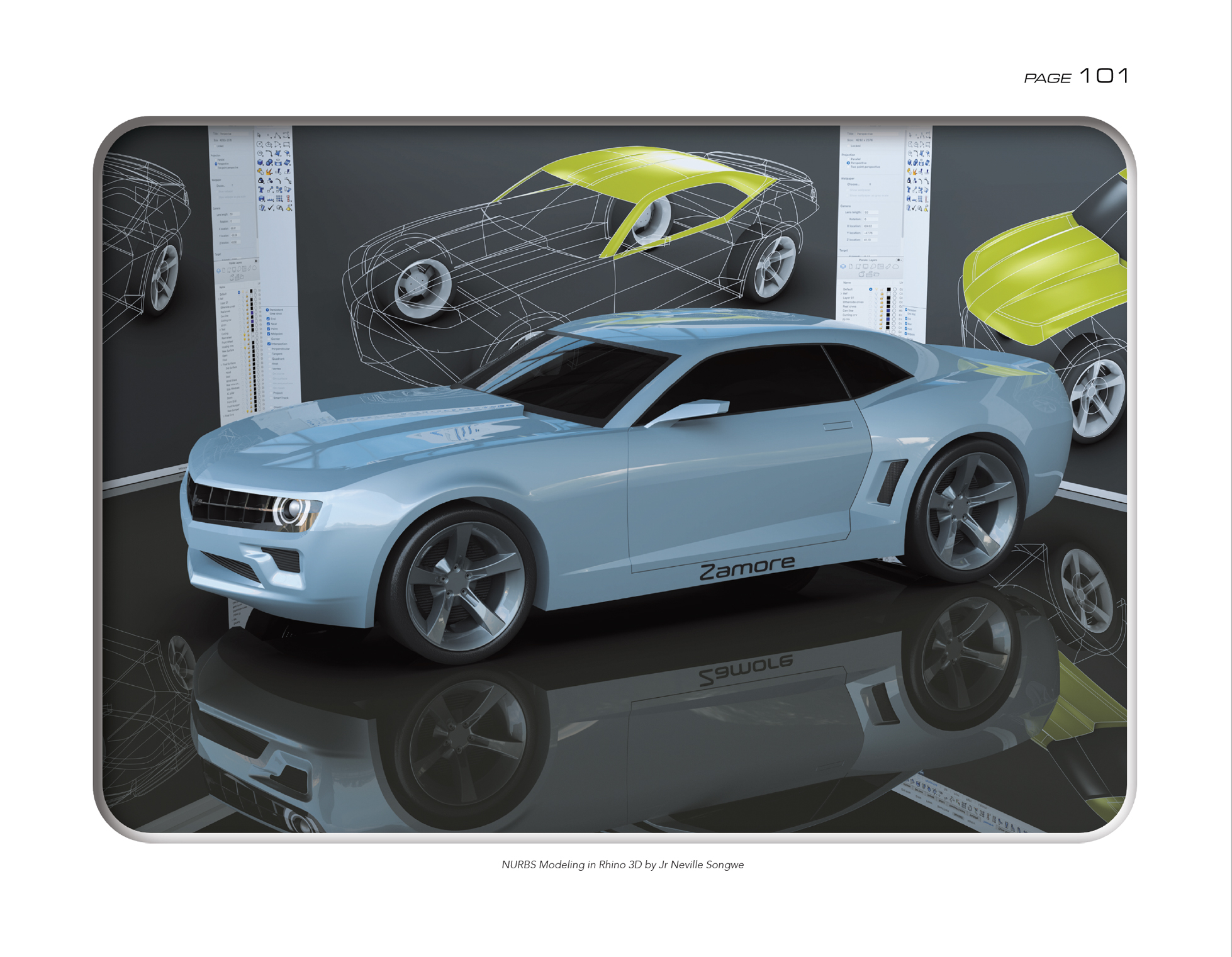
This book targets industrial design students, design professors, design practitioners, and others interested in industrial design (product design). It offers a guide or roadmap by providing: Design Templates, 7 Historic timelines, 50 Schemas, 100 Drawings, and Illustrations. Rhino (NURBS and SubD) was used to develop and illustrate all the 3D CAD concepts in the book, featured on pages 2, 7, 11, 57, 87, 101, 180, 206, and 207.
The book is available for purchase from the following links:
CrossGems is a professional jewelry software that allows you to design any complex model easily and quickly without having technical CAD knowledge.
Core and Features
All objects are linked in real time to automatically adapt when edited, allowing you to delete or modify Boolean operations or any of the 100+ CrossGems tools and keeping the parametric history in all cases. Additionally, this feature applies to Rhino gumballs, allowing you to reset transformations (move, scale, and rotate) applied to model parts and restore deleted document objects at any time, including SubD objects and Meshes, while maintaining compatibility with Rhino's Record History function.
It can also be used as a traditional modeler without the parametric system, adding the modeled objects as normal Rhino geometry.
For the most advanced users, all the tools in Rhino are also available in Grasshopper, making it one of the most versatile software in the Rhino world.
Interface
CrossGems can be run with its own interface, simplifying the workflow and as a Rhino plugin while keeping all the parametric features for users used to Rhino UI. The Command History Panel, available in Rhino and CrossGems UI, is the visible part of this system that allows the user to interact with and manage all the model components.
Rendering
It also includes a rendering material library with over 300 materials and grounds for the integrated physics-based render Cycles.
Materials and grounds are assigned with a single click, displaying the object weights in real-time while using any tool or simply selecting objects in the document. Furthermore, CrossGems will automatically swap materials when changing display modes to achieve the best quality for every situation.
Compatibility
CrossGems is capable of importing and converting gems from other software, such as RhinoGold and Matrix, as well as importing Panther files while maintaining 100% parametric history.
About CrossBytes 3D
CrossBytes' background goes back to the origins of RhinoGold, developing from RhinoGold 3 to RhinoGold 6.5 for more than ten years. Finally, the company was acquired by a multinational. At this point, CrossByte created Panther 3D, the world's first parametric jewelry software from Rhino and Grasshopper. CrossGems is its evolution in every respect.
"Throughout all these years we have learned thanks to listening to users and we can say that we have built a program with jewelers and for jewelers within the reach of anyone and we intend to continue doing so, so if you have any requests, doubts, or suggestions feel free to email us at hello@crossbytes3d.com."
Learn parametric design without prior coding experience in just eight weeks
Krzysztof Wojslaw from LearnGrasshopper will guide you through the transformation from an "old-school" engineer with zero programming experience to an engineer of the future who can automate manual tasks and have much more fun at work.
Krzysztof Wojslaw, the training author, will answer all questions connected to the learning platform and how to start with Grasshopper completely from scratch.
The 2Shapes team is happy to announce 2Shapes Design 4 for Rhino, the newest version of the jewelry design plugin for Rhino. Developed by the industry leaders that made RhinoGold and Clayoo, this new version gathers all the experience learned over the years, solving the needs of jewelry design professionals.
2Shapes 4 for Rhino includes many improvements and new features that make it one of the most powerful programs on the market today.
Construsoft is a leading supplier and developer of BIM (Building Information Modeling) software and related services. Their portfolio includes products and applications that provide an accurate, detailed, and data-rich 3D environment for the design and construction industry.
They were interested in creating a free online application that would allow them to showcase their knowledge for calculating and optimizing the design of metal structures. They knew Grasshopper was a powerful tool to build such an application, but they needed a way to host these files online and make them available to anyone via a web browser. Recently, they found out that ShapeDiver could give them these capabilities and even allow them to use third-party plugins such as Karamba3D and Geometry Gym.
In this interview, ShapeDiver talks with Construsoft's team and discusses the topics surrounding this powerful online tool called Optinave.
Founded in 1980, McNeel is a privately-held, employee-owned company with sales and support offices and affiliates in Seattle, Boston, Miami, Buenos Aires, Barcelona, Rome, Tokyo, Taipei, Seoul, Kuala Lumpur, and Shanghai with more than 700 resellers, distributors, OEMs, and training centers around the world.
.png)




 Subscribe
 Posts
Posts

