Showing posts with label app. Show all posts

Tuesday, May 26, 2026

MatrixGold 4.0 released

Gemvision Releases MatrixGold® 4.0 
Design Smarter. Create Faster. 

Gemvision announced the release of MatrixGold 4.0, the latest evolution of its industry-leading jewelry CAD software. This new version introduces a workflow-driven approach that improves the way designers create, validate, and prepare for production—bringing greater efficiency, clarity, and control at every stage of the design process. 

MatrixGold 4.0 is built on a clear premise: The value of jewelry CAD is not defined by the number of tools available but by how effectively those tools support the way designers work. By aligning design, material decisions and production insights into one continuous workflow, MatrixGold 4.0 helps users move from concept to manufacturing with greater confidence. 

“Drawing on comprehensive global customer feedback, we have gained a clear understanding of user needs  regarding MatrixGold for streamlining daily operations,” Oriol Collelldemont, director of Gemvision. “Enhancing  customers’ workflows is what establishes MatrixGold as an indispensable resource for increasing productivity.  With MatrixGold 4.0, our focus has been on making it a tool suited to meet the requirements of every jeweler.”  

One of the key advancements in MatrixGold 4.0 is the ability to make informed decisions earlier in the design process. Tools, such as Scoop, allow users to reduce metal weight while maintaining structural integrity,  directly supporting cost control and margin protection. The redesigned Tech Report provides clearer, more structured production data, helping designers and manufacturers align faster and move forward with confidence. 

Additional new tools and enhancements include:

  • Offline Mode: Work for up to 12 hours without an internet connection, ensuring continuous productivity across environments.
  • Duplicate Command: Replicate parametric elements while preserving values, enabling faster design adjustments and iteration.  
  • Multi-Prong Edit: Modify multiple prongs simultaneously to improve consistency and reduce manual effort.  
  • Custom Gem Builder: Create and define custom gemstone shapes with precision, from table to culet.
  • Expanded Gem Shape Library: New cuts, including Lozenge, Hexagon, and Trapezoid, expand creative possibilities.  
  • Award Ring Builder: Add custom text, shapes, and details to signet ring designs with a structured workflow.  
  • Curve on Object: Apply curves directly to surfaces for precise, controlled design placement. 

MatrixGold 4.0 also works with Rhino 8, ensuring compatibility with the latest modeling environment and performance improvements. 

“Our dealer network and in-house production provide valuable insights into the jewelry industry, enabling us to  improve our tools. Combining these insights with user feedback, we released our most advanced version of  MatrixGold. Every tool reflects the unique touch of jewelers.” Oriol Collelldemont 


Wednesday, May 6, 2026

Monoceros 3 now available!


Hong Kong Drone Module
Drone-based prefabricated architecture using WFC
by Johan Navarro, Estudio panamétrico, 2022

Monoceros is a Grasshopper plugin that assembles discrete modular structures using Wave Function Collapse. You design a set of parts, define how their faces connect, and the solver fills a 3D envelope with valid combinations. The results can range from architectural facades and spatial partitions to furniture, game environments, or abstract sculptures.

The biggest change in version 3 is how you set up a project. In previous versions, defining adjacency rules between modules was manual and error-prone, especially with rotated variants. Version 3 introduces connectors. You describe how each module face connects, including its rotation and symmetry, and the full rule set is derived automatically. Modules no longer need to be duplicated for each orientation. The overall setup requires significantly fewer components than before, both from Monoceros and from Grasshopper itself.

Documentation, workflow guides, and example files are at monoceros.tools. The documentation is also structured for AI assistants like ChatGPT and Claude, which can help set up and troubleshoot definitions.

Monoceros 3 is free to use with a limited number of solver runs per session. A license removes the limit. Educational pricing is available. Projects from earlier versions can be converted.

Monoceros was created by Ján Pernecký and Ján Tóth. Version 3 was developed independently by Ján Pernecký.


Thursday, April 30, 2026

Ant AI - a context-aware AI assistant for Grasshopper


Ant AI is a context-aware AI assistant that lives directly on your Grasshopper canvas

Unlike standard chatbots, Ant "sees" your work. By selecting components as context, you can interact with an LLM that understands your specific data structures, component connections, and design intent without ever leaving the Rhino/Grasshopper environment.

Born from a concept at the AEC Tech Hackathon in London, Ant has evolved into a professional-grade tool that removes the friction between a designer’s idea and a functional parametric definition.

Transform your workflow with three powerful modes

Ant features a seamless chat interface with three primary modes and specialized commands to handle the "heavy lifting" of computational design:
  • Ask Mode:
    • Understand Logic: Inherited a complex script? Select a group of components and get an instant algorithmic breakdown.
    • Debug & Plan: Ask for advice on how to solve a geometric problem or find out why a specific definition isn't working.
    • Explain: Receive a step-by-step logic overview of any selected part of your definition.

  • Edit Mode:
    • Natural Language Building: Use simple text prompts to generate native Grasshopper components and wire them together automatically.
    • Modify on the Fly: Tell Ant to "add a slider to control the radius" or "divide this surface into panels," and watch the definition update instantly.

  • Script Mode:
    • Zero-Friction Coding: Generate Python or C# code directly within script components.
    • Auto-Context: Ant automatically reads your component’s input names, data types, and structures (Item vs. List Access). You no longer need to spend 10 minutes explaining your data tree to a separate chatbot.
    • Instant Execution: Write the prompt, and Ant injects the compiled code directly into the editor.
Key features:
  • Context-Awareness: Select any part of your canvas to provide the AI with the specific context it needs for accurate responses.
  • Integrated UI: A modern, dockable chat window that supports both Light and Dark modes.
  • Native Output: Generates real Grasshopper components and wires, not just text-based instructions.
  • Multi-Language Scripting: Full support for C# and Python.
  • Iterative Design: Use the chat history to refine and evolve your definitions through conversation.

Wednesday, April 29, 2026

RhinoCAM 2026 released


RhinoCAM is a powerful CAM (Computer-Aided Manufacturing) plugin built specifically for Rhino, designed to help CNC programmers, machinists, and engineers generate accurate toolpaths directly within their Rhino workflow. 

RhinoCAM 2026 brings some significant "under the hood" speed boosts and new high-end machining modules. The big theme for this year is performance acceleration (especially for simulation) and automation for complex 5-axis work.

It supports 2 Axis to 5 Axis toolpath creation (2½, 3, 4, and 5-axis), simulation, and post-processing, all inside Rhino’s modeling environment.
  • Fully integrated with Rhino (Windows only)
  • CAM engine powered by VisualCAM
  • Ideal for professionals working on complex 3D parts and freeform geometry
RhinoCAM includes modules for MILL, TURN, NEST and ART.


Monday, April 13, 2026

Cyberstrak 2.0 for Rhino 7 and 8 - Advanced modeling for product and automotive


Cyberstrak has released a new major version of its Rhino plugin. 

Cyberstrak 2.0 contains a lot of new and updated functionality:
  • Licensing has been completely re-worked. In parallel with subscription licensing, support for perpetual licenses is now available using Rhino Account Licensing (Cloud Zoo) or Rhino's LAN Zoo.
  • New commands for creating and modeling Curves and Surfaces are available.
  • Especially when working in "Projection Base" mode on top of a selected Mesh, it gives new possibilities in Reverse Engineering processes.
  • Many detail improvements like a dynamic deviation handle, new mesh area selection methods, or support for using a bunch selected CVs in Cyberstrak's powerful CV.
  • Improved efficient modeling.
  • As usual, all modeling commands contain a local Undo/Redo and can be used in parallel with associative dynamic analyses, allowing instant control of the shape quality.

Monday, February 9, 2026

RhinoCFD v3: Professional CFD Analysis Now Fully Optimized for Rhino 8


RhinoCFD v3 brings professional-grade Computational Fluid Dynamics (CFD) directly into Rhino 8. This latest release officially establishes compatibility with Rhino 8, enabling users to leverage the platform's updated interface and improved performance for complex fluid and thermal simulations entirely within their CAD workspace.

Powered by the brand-new PHOENICS 2025 v1.0 engine, this update introduces a decoupled Monitor Plot Window. This feature allows designers to track convergence, residuals, and spot values in real time without slowing down Rhino. Simulation setup is now more intuitive than ever; the computational grid reacts instantaneously to geometry changes—such as moving, adding, or copying objects—making the design-to-analysis loop faster and less error-prone.

New physical modeling capabilities include the Spalart-Allmaras turbulence model for aerospace/external flows and advanced VOF boiling and condensation mechanisms. Post-processing is similarly enhanced, enabling users to apply custom mathematical expressions to results and automatically visualize critical data points with new minimum/maximum markers.

By keeping the entire workflow within Rhino, RhinoCFD v3 eliminates the need for cumbersome geometry exports, making high-fidelity engineering analysis seamless part of the modern design process.

Tuesday, February 3, 2026

Rhino2CATT — Create Complete CATT-Acoustic Models Directly Inside Rhino


Rhino2CATT allows acousticians, architects, and designers to prepare complete CATT-Acoustic models directly within Rhino. 

Users can model geometry, assign custom acoustic materials with frequency-dependent absorption and scattering coefficients, define sources and receivers, and export the complete setup to CATT-Acoustic with a single click. With its dockable panel, Rhino2CATT integrates seamlessly into the Rhino environment, streamlining model modifications and optimization, making them faster, easier, and fully integrated with Rhino and Grasshopper workflows. Built on algorithms trusted by world-renowned acousticians, Rhino2CATT ensures efficient and accurate model setup.

Key features include automatic geometry export with vertex optimization, custom material libraries, and custom directivity and spectra databases for sound sources. Export your model to CATT-ready files (.geo, .loc) with a single click for a highly efficient Rhino-to-CATT workflow. BIM-based workflows are also supported via Rhino.Inside.Revit, ensuring smooth collaboration between architectural and acoustic modeling processes.

Ideal for designing concert halls, lecture rooms, and other spaces, Rhino2CATT provides a fast, intuitive way to set up and optimize accurate CATT-Acoustic models entirely within the familiar Rhino environment.


Monday, December 22, 2025

Termite: Rhino Grasshopper Plugin Developed for 3D Printing of Clay


Termite is a plugin developed for Liquid Deposition Modeling (LDM) 3D printing, designed specifically for clay and other paste-based materials. Created by Julian Jauk at Graz University of Technology, it has been tested in seminars, architectural prototypes, and international workshops, and is already used in several educational institutions.

Unlike conventional slicing tools built for thermoplastics and small nozzles, clay printing typically uses nozzles from 1-30 mm, requiring precise control of the path layout, material flow, and printer movement. Termite fills this need by integrating essential slicing features—such as custom path generation, sorting algorithms, variable parameters within a single print, inrun speed control for smooth starts, extrusion flattening for reliable adhesion, and automatic detection of path intersections—directly into the parametric design environment of Rhino and Grasshopper.

Termite provides 20 modular components across the categories Main, Create, Sort, Display, and Example, supporting both beginner and advanced workflows. It is designed as an easy-to-use tool for Grasshopper newcomers, with features working immediately after installation, while still offering maximum freedom for experimental fabrication through its open, modular structure. Users can design printing paths in Rhino, Grasshopper, or via Termite’s own components, with all required G-code generated in real time.

Suitable for clay and earth-based mixtures, concrete, biopolymers, biomaterials, and various food-grade pastes, Termite works not only with LDM printers such as the WASP 40100 LDM and Delta WASP 2040 Clay but also with any machine capable of interpreting G-code, including Cartesian and polar printers or robotic arms.

Termite is available for Windows and macOS for Rhino 6 or later. The plugin includes an installer, example files, and a tutorial video. It is entirely free to use and can be downloaded via food4Rhino or installed directly through the Rhino Package Manager.


Tuesday, December 2, 2025

MatrixGold 3.11: The Agility Update


Gemvision has released MatrixGold 3.11, a new update featuring powerful
tools and enhancements that streamline the jewelry design process.

From creating intricate settings to optimizing workflows and producing realistic visuals, this version offers designers greater flexibility, precision, and creative control, enabling them to bring their ideas to life with ease.

What’s New in MatrixGold 3.11
  • iJewel3d Integration - Produce high-quality visuals in seconds with advanced materials and realistic lighting.
  • Smart Prong - Place prongs accurately between stones in a stone line and streamline your setting process for faster, more efficient workflows.
  • Boolean One by One - Simplified complex Boolean operations with greater control by isolating and fixing elements individually for cleaner results.
  • Matching Band Rail - Automatically generate a band that perfectly follows your ring’s contour, giving you a seamless, fully customizable fit.
  • Global Parametric ON/OFF - Toggle parametric mode on or off across all tools with a single click, taking full control of your workflow.
  • Bounding Box - View exact geometry dimensions instantly in the viewport and keep every measurement accurate and visible.
  • Project Manager Tags - Organize your work effortlessly by adding custom tags to your projects and quickly locating related files when you need them.
  • Quick Command Tags - Navigate and organize your favorite tools faster with new color-coded tabs designed for clarity and efficiency.
  • This update also includes additional improvements to help jewelers work smarter and more efficiently across the platform.

Monday, November 3, 2025

Introducing Carbonfly: CO2-based CFD for Indoor Air Quality in Rhino and Grasshopper


Carbonfly is a free, open-source Python library and Grasshopper toolbox for CO₂-based indoor airflow and air quality simulation. Developed by researchers at the Institute of Energy Efficiency and Sustainable Building (E3D) - RWTH Aachen University, Carbonfly brings the power of scientific Computational Fluid Dynamics (CFD) into the visual programming environment of Grasshopper, making professional indoor environmental modeling more accessible to architects, engineers, and design practitioners.

Carbonfly integrates OpenFOAM through the Windows Subsystem for Linux (WSL), enabling complete CFD workflows to run seamlessly on Windows machines commonly used in architectural and engineering practices. Users can prepare boundary conditions, build simulation cases, and run CFD processes directly within the Rhino and Grasshopper environment.

The toolbox provides predefined boundary conditions tailored for indoor airflow simulations, including mechanical supply and exhaust, window-driven natural ventilation, and dynamic human respiration. Additional helper tools assist in estimating wind-driven ventilation and air exchange rates based on building physics standards.

Carbonfly also includes documented examples of mechanically ventilated rooms, naturally ventilated spaces, and dynamic breathing scenarios, offering an intuitive learning path for new users.

By combining the strengths of Rhino and Grasshopper in parametric modeling with the high-fidelity physics of OpenFOAM, Carbonfly creates a streamlined workflow for user-centered, healthy building design—all without leaving the Grasshopper interface.

Tuesday, October 28, 2025

Segmeridian for Rhino - medical image segmentation


Segmeridian for Rhino is a powerful semi-automated client-based medical image segmentation:
  • Robust and solid medical image segmentation tool.
  • Powered by cutting-edge machine learning advances in medical imaging, 3D geometry processing, and computer vision.
  • Combines CT/MRI imaging, mask layers, and mesh processing in a single client-based application.
  • Complete end-to-end workflow from DICOM/Nifti to mesh stereolithography.

Thursday, October 23, 2025

MetaMAP: Urban Planning Tools for Rhino and Grasshopper


MetaMAP is a free, open-source Grasshopper plugin designed to help architects, urban planners, and designers visualize urban data. 

It offers a comprehensive set of tools for generating building geometries and terrain, all directly within the Rhino environment. By leveraging Rhino and Grasshopper, MetaMAP plans to streamline the urban analysis workflow, enabling users to make data-driven decisions for more sustainable, efficient urban designs. You can find more detailed information and tutorials on food4Rhino.


Friday, July 4, 2025

MatrixGold 3.10: The Efficiency Update


Gemvision has released MatrixGold 3.10, introducing a powerful set of tools and enhancements designed to streamline your workflow and give you greater creative control—whether you’re managing intricate stone settings or optimizing design files.

What’s New in MatrixGold 3.10
  • Azure Cutters – Enhance gem finishes and reduce gold weight for a refined look while optimizing material use.
  • Bezel Scaling Based on Gem Sizes – Bezels now automatically scale to match the dimensions of each gem, ensuring accurate and consistent settings across designs.
  • Prong Guides – Gain full control over prong placement with the ability to position prongs freely on any stone, regardless of shape or orientation.
  • Scanned Gems – Convert scanned gem meshes into MatrixGold-compatible gems, enabling bezel creation, offset curve application, and integration into standard workflows.
This update also includes additional improvements to help jewelers work smarter and more efficiently across the platform.


Tuesday, June 3, 2025

Astroid 7000 Spaceball 3D Mouse - new Rhino integration


Spatial Freedom, based in Sydney, Australia, is launching a crowdfunding campaign for its new 15-button wireless Astroid 7000 Spaceball 3D Mouse on Indiegogo.

Created by the inventor of the original Spaceball, the Astroid 7000 and its Rhino plugin will deliver advanced functionality at around half the price of existing products.

Live Interactive Spaceball Flythroughs

Discover a new, dynamic way to explore and present your designs with the Astroid Spaceball and its flythrough capability powered by the Astroid on Rhino 8 plugin. The Spaceball technology enables seamless navigation within and around 3D models, capturing high-quality, real-time animations via screen recording.

To see this in action, check out the Astroid 7000 Spaceball 3D Mouse prelaunch video on Indiegogo!

How It Works
  • Fluid Navigation: The Astroid provides intuitive pan, zoom, and spin navigation, allowing designers to glide effortlessly through and around their models.
  • Screen Capture: Live motion is recorded in real-time to create high-impact flythrough animations that showcase spatial relationships, form, and design intent.
  • Marketing and Communication Benefits: You can use the recorded flythroughs to create engaging promotions, supporting pitch presentations, social media campaigns, and design reviews. They also enhance collaboration by helping colleagues, partners, and clients visualize designs with greater clarity.
Use Cases
  • Product Demonstrations: Showcase key design features in a compelling and interactive way.
  • Architectural Walkthroughs: Navigate interiors and exteriors with precision, highlighting spatial layouts.
  • Engineering Design Reviews: Easily communicate and review internal and external design structure and intent.
  • Creative Marketing Content: Convert interactive flythroughs into polished videos for advertising and investor presentations.

Monday, May 12, 2025

MatrixGold 3.9: The Performance Update


Gemvision announced the release of the first of three major updates coming to MatrixGold Version 3 in 2025. The MatrixGold 3.9 update introduces powerful new features and enhancements that give users more control, speed, and efficiency.  MatrixGold 3.9 is built to streamline the jewelry design process, from refined parametric workflows to fully customizable quick commands.

“The MatrixGold 3.9 update represents a significant step forward in our product development,” said Oriol Collelldemont, Product Director at Gemvision. “It’s built on feedback from our customers, whose insights continue to shape the software to better support their business needs.”

The breakthrough in this update is the Dynamic Power Toggle, which lets users decide when to recalculate geometry. This game-changing feature for complex designs with multiple operations allows users to make all necessary edits first and recalculate only when they’re ready, saving time and system resources.

Some additional new tools include
  • Quick Commands: Enables users to create personalized tool layouts by organizing frequently used features into custom tabs, allowing faster access and a more streamlined workflow.
  • Static Surface Prong: Provides a non-parametric option ideal for designs with large stone arrays. This feature reduces file size while maintaining precision and integrates smoothly with tools like Gems Placer.
  • Performance Boost: Delivers faster file loading, smoother copy/paste operations, and overall performance enhancements that improve efficiency across daily tasks.
Additional updates include
  • Improved weight accuracy for the Mirror Gems tool
  • Enhanced toggle behavior for Bezel Chamfer
  • Persistent layer preferences across sessions
  • Fixes to Comfort Fit functionality

“We're thrilled to announce this update, with two more still to come in 2025,"
says Alex Stuller, Executive Director of Gemvision. "As the landscape of jewelry design continues to evolve, MatrixGold empowers jewelers with the tools they need to push the boundaries of innovation. We're proud to be part of this vibrant community and excited to keep delivering the industry's leading software.”


Monday, April 14, 2025

Building 3D web apps with Rhino Compute and Modelup - Recorded webinar now available!


If you could not attend the latest Rhino User Webinar live, the recording is now available!

Do not miss it if you want to build 3D web apps and configurators with Rhino Compute and Grasshopper

Emil Poulsen has shared his best tips and tricks for creating an excellent user experience while avoiding common pitfalls.


Monday, April 7, 2025

Qbitec for Rhino - new large-scale point cloud data plugin


Qbitec for Rhino - new large-scale point cloud data plugin

Qbitec are in the early stages of development and would love to hear from the Rhino experts. Your experience and insights are invaluable to them, and they would like to know:
  • What challenges do you face when working with point cloud data in Rhino?
  • Are there specific features or tools you wish to enhance your workflow?
  • What’s your vision for an ideal point cloud processing experience in Rhino?
How you can help:

Thursday, March 27, 2025

Rhino User Webinar: Building 3D Web Apps with Rhino Compute and Modelup


Rhino User Webinar
Tuesday, April 8, 2025, 3:00 PM (CEST)

Join us in this webinar to explore the art of building 3D web apps and configurators with Rhino Compute and Grasshopper. We will share our best tips and tricks for creating an excellent user experience while avoiding common pitfalls. You will also get a demo of the Modelup platform, where Grasshopper users can upload definitions and turn them into interactive, web-based configurators.

About the speaker:
Emil Poulsen co-founded Modelup, a company that builds web-based 3D apps and configurators powered by Rhino and Grasshopper. Emil has a background in architecture, engineering, and software development and has previously worked at companies such as Thornton Tomasetti and Buro Happold.

Wednesday, October 23, 2024

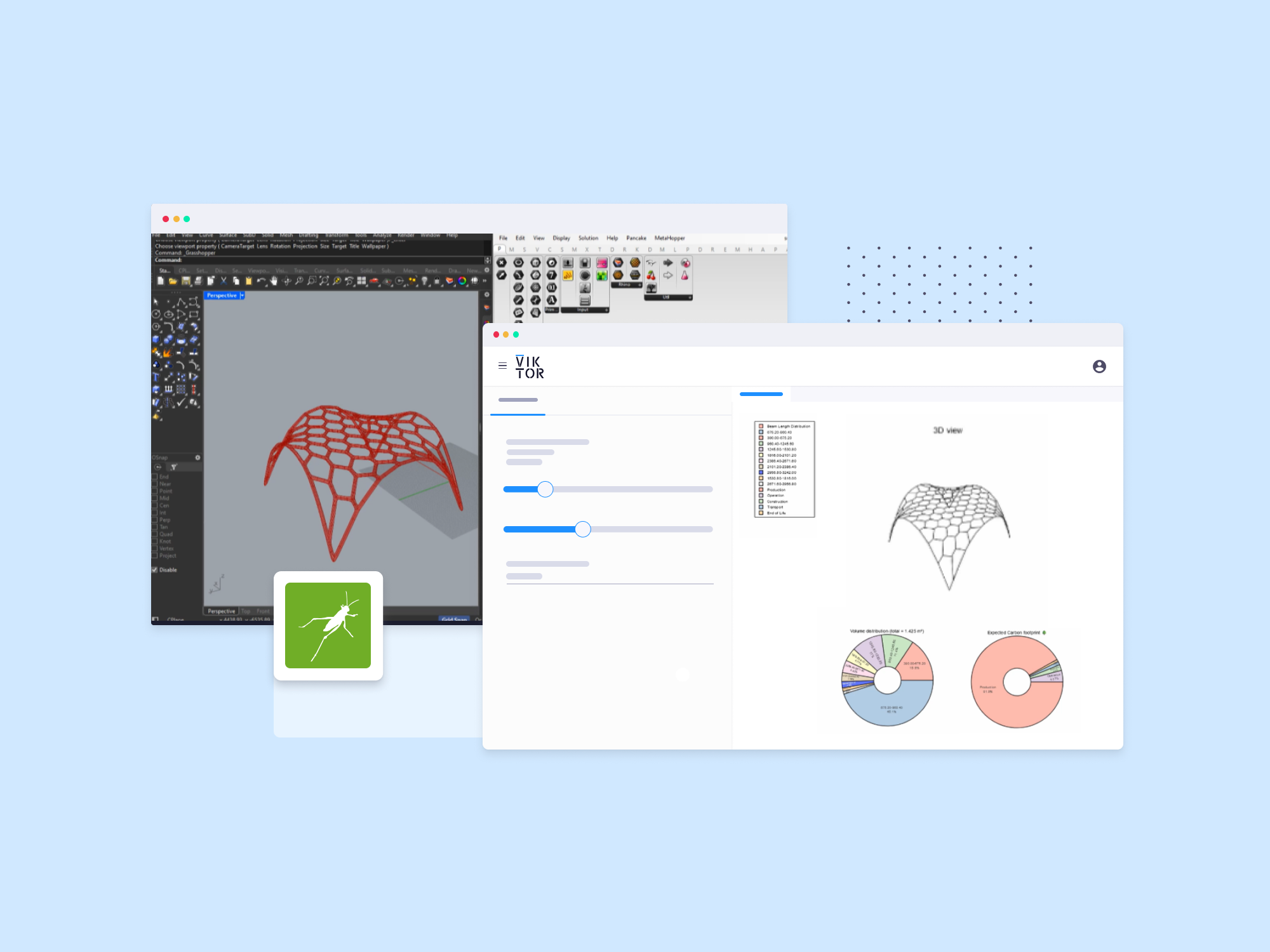
Combine the power of Grasshopper and Python in VIKTOR


VIKTOR's latest update lets you create nodes to connect to VIKTOR apps!

VIKTOR is a platform for building web applications that enable users to create interactive tools for engineering, design, and automation using Python. It provides a framework for developing custom editors, visualizations, and integrations with external tools like Grasshopper, allowing for efficient workflows.

Thanks to the new Grasshopper nodes, you can now create a workflow that allows you to send designs to a calculator or dashboard with just the click of a button.

The nodes also let you pull information from VIKTOR, meaning you can now use VIKTOR apps as calculators for Grasshopper models and much more!


Monday, July 8, 2024

Opossum Release for Rhino 8


ICD University Stuttgart is pleased to announce the latest update of Opossum, version 3.1.1, which is now fully compatible with Rhino 8. This update addresses a critical bug where expert settings inadvertently overwrote the settings tab.

Opossum, the Grasshopper plugin, offers enhanced features for optimization tasks, including:
  • RBFOpt and CMA-ES algorithms for single-objective optimization
  • Multi-objective algorithms: RBFMOpt, MACO, MOEA/D, NSGA-II, NSPSO
  • Performance Explorer for real-time feedback on design spaces
Opossum 3.0.0-beta, as well as 1.5.0 and lower, was developed at the Advanced Architecture Lab with support from the SUTD-MIT International Design Centre and is currently being developed at ICD University Stuttgart.