skip to main |
skip to sidebar
NextFEM Designer is a free tool for structural analysis for Windows that supports different solvers, such as OOFEM, OpenSees, and CalculiX, and can handle models from more than 20 formats.
Now, you can use it with Rhino 8 and Grasshopper with the brand-new NextFEM-Link for Grasshopper, which brings some components to export the Rhino model to NextFEM Designer and a .NXF (NextFEM format) file. In addition, some query tools are available to use quantities in the model, such as nodal coordinates and element connectivity.
You can use Rhino 8 to model complex geometries and NextFEM-Link to translate them automatically into a NextFEM model, which can be seamlessly analyzed in the solver you prefer or even exported to other proprietary formats.
In its first release, NextFEM-Link translates curves and meshed entities to linear and planar finite elements. Instructions on its use are available.
Finally, NextFEM always listens to the needs of its users; feel free to request new functionalities using this form.
At the beginning of the structural design process, there are two common approaches to defining geometries: Create complex and parametric geometries directly using Rhino and Grasshopper or leverage the power of Rhino.Inside to transfer geometry directly from Revit.
Now, with CondorShell, engineers can easily export geometry and data from Rhino and Grasshopper to SAFE V20.3.0, making the structural analysis and design much faster. With CondorShell, engineers can create workflows to automate design tasks in the design of foundations and the design of slabs in CSI SAFE.
CondorShell is a Grasshopper-based component just released by Artificial Intelligence Optimization Software, LLC (AIOS). CondorShell 1.0.0 is available to download beginning October 10.
CondorShell comes in two versions: Basic and Pro. There is extensive documentation as well as short videos and examples that illustrate the use of every single CondorShell component. Both versions will help you establish more efficient workflows, saving valuable time during design.
- CondorShell Basic: Available using the PackageManager in Rhino, this free version features 20 components that support the creation of your SAFE model. See the 1-minute video tutorial, How to Install CondorShell Free Limited Version.
- CondorShell Pro: To experience the full capabilities of CondorShell, users can upgrade to the paid version which provides 54 additional components that facilitate the creation of complex geometries in your SAFE model. To activate the Pro version, follow the installation instructions in the 3-minute video tutorial, Installing CondorShell.
Send your comments and feedback to support@aiosciv.com. Happy coding!
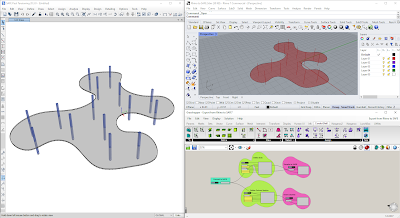
There are two common approaches to defining geometries at the beginning of the structural design process. Engineers can create complex and parametric geometries directly using Rhino and Grasshopper, or leverage the power of Rhino.Inside to transfer geometry directly from Revit. With CondorShell, engineers can now easily export geometry and data from Rhino and Grasshopper to SAFE V20.3.0.
CondorShell is a Grasshopper-based component just released by Artificial Intelligence Optimization Software, LLC (AIOS). CondorShell 1.0.0-beta is available to download beginning July 15.
CondorShell comes in two versions: Basic and Pro. Both versions will help you establish more efficient workflows, saving valuable time during design. Extensive documentation is included, as well as short videos and examples that illustrate the use of every single CondorShell component.
- CondorShell Basic: Available using the PackageManager in Rhino, this free version features 20 components that support the creation of your SAFE model. Watch the 1-minute video tutorial that shows how to install it.
- CondorShell Pro: To unlock additional components and experience the full capabilities of CondorShell, you can upgrade to the paid version, which provides 54 components that facilitate the creation of complex geometries in your SAFE model.
For the duration of the beta test, the cost of our Pro version is waived to enable design professionals to test and provide feedback on the complete functionalities of the plugin. To activate the Pro version, follow the installation instructions in the 3-minute video tutorial, Installing CondorShell.
The beta period will run through August 5, 2022, when all beta licenses expire. Send your feedback to support@aiosciv.com. Happy coding!

The new Grasshopper Component in Tekla Structures uses the Rhino.Inside technology. This brings Tekla users the benefit of visual scripting in Grasshopper without each Tekla user needing to be exposed to the visual script itself. Furthermore, this provides developers a powerful new way of creating logic for custom components in Tekla using visual scripting.
Tekla's custom component is an intelligent object type in Tekla Structures that can be used for connections, reinforcement and other details as well as for larger parametric objects like sandwich walls or staircases.
Until now, new custom component types have been created by anyone using the Tekla Open API or using the custom component editor within Tekla. Now, new custom components can also be created with Grasshopper. The logic is provided by any Grasshopper definition that then creates objects in Tekla Structures.
The benefit for the Tekla user is that using the new Grasshopper Component they do not need to know visual scripting to use a Grasshopper definition. For the custom component developer, creating component logic with Grasshopper can be more straightforward especially when it comes to geometry.


.png)


 Subscribe
 Posts
Posts

