Friday, April 28, 2023

Robotic Fabrication with COMPAS FAB


Digital Fabrication in the Architecture, Engineering, and Construction industry requires the seamless integration of diverse tools and software across various domains. COMPAS, a comprehensive open-source computational framework in Python, simplifies the integration of cutting-edge tools and streamlines multi-disciplinary workflows, making it easier for architects, designers, and researchers to adopt them within parametric design settings.

In this 2-day workshop, Gonzalo Casas of Gramazio Kohler Research - ETH will introduce participants to the COMPAS framework, showcasing its core functionality, extension packages, and compatibility with Rhino 3D. Participants will then collaboratively explore a hands-on example focused on robotic fabrication of a discrete assembly guided step-by-step.


Thursday, April 27, 2023

Digital Fabrication Showcase by RhinoFabStudio


To all our Certified RhinoFabStudios, ARTCs, and ARTs, we want to thank you and express our appreciation for all the work that you do.

We have created a portfolio called Digital Fabrication Showcase that includes outstanding computational designed projects manufactured in these centers worldwide before 2020. Check out these exceptional projects!


If you are a Certified RhinoFabStudioARTC, and ART, please share your most remarkable projects with us so we can include them in our new portfolio. We want to display your projects and developments in the latest version of our Digital Fabrication Showcase.

Fill out this form to get started!


For more information, please get in touch with Lucia Miguel at lucia@mcneel.com


What is RhinoFabStudio? A RhinoFabStudio™ (fabrication studio) is a small-scale digital workshop, certified by McNeel, with an array of Rhino and Rhino compatible software and computer-controlled tools and training. These tools cover the various leading-edge industrial methods and materials needed to design, analyze, and fabricate almost anything.

To become a Certified RhinoFabStudio, visit this link!

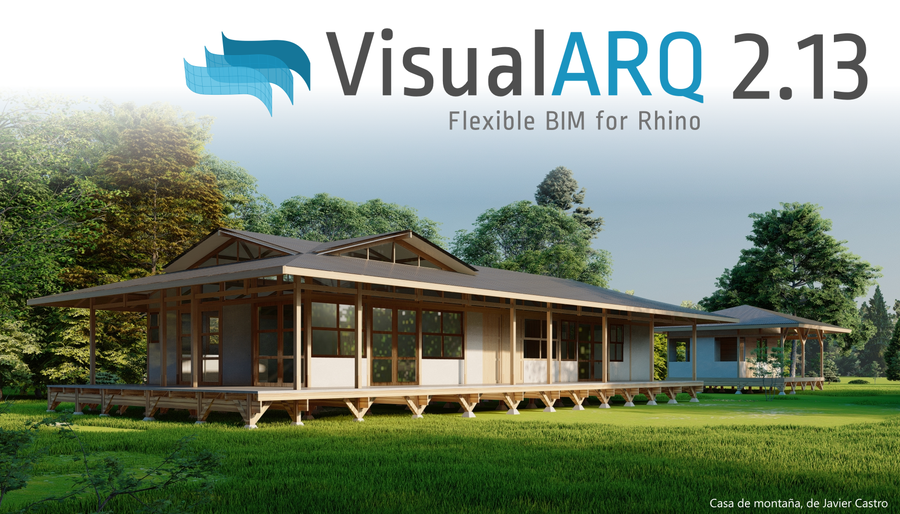
VisualARQ 2.13 released!


VisualARQ 2.13 is now available to download!


This is a free update for VisualARQ users.


It includes new features and fixes for issues reported by users:

  • Now reference VisualARQ objects with the Grasshopper Player
  • Added Chinese (Traditional) language
  • Component to get the start and end planes of a beam
  • New API scripts available
  •  Improvements in performance
  • Support to V-Ray Interactive Render


More information...

Download VisualARQ 2.13...


VisualARQ Labs


One of the main features of VisualARQ 2.13 is the option to create new commands involving VisuaARQ objects. We have arranged some of them in the VisualARQ Labs plugin, which streamlines the modeling process.


More information... 

Wednesday, April 19, 2023

Bella, a Render plugin for Rhino WIP


DiffuseLogic is pleased to announce the public release of Bella 23.3, which supports the future Rhino 8 on both Windows and MacOS (supporting both Intel for Rhino 6 & 7 and Apple Silicon for Rhino 8). Other highlights include improvements in performance and many features such as grass, volumetrics, subdivision, displacement, IES lights, render-time corner rounding, new 2D and 3D textures, render-time projections for all 2D textures, Live Lights, and of particular interest to many Rhino users, an Auto-boolean feature that allows proper rendering of gems with no need to cut pockets.


Monday, April 17, 2023

Tweener plugin: New version on food4Rhino


In Rhino, to tween means to generate curves that interpolate between given input curves. The word's first appearance is not entirely clear—it was used at least as far back as in Tolkien, but it is safe to think of the word as the verb form of "between". In any case, tweening is a very basic operation and a fundamental part of the designer's toolbox. However, it can quickly result in curves that intersect each other or self-intersect, even on moderately complex input curves. Crossing tween curves are often undesired for aesthetic and practical reasons.

Tweener is a Rhino and Grasshopper plugin that solves this problem. It strictly guarantees the absence of crossings and intersections whenever the input curves don't intersect. In its simplest use case, the TweenPlanCurv Grasshopper component can be used directly as a stand-in replacement for the TweenCrv component, and the command TweenCurves2 can replace TweenCurves. Moreover, Tweener allows any number of closed planar input curves—not just two or any two but not necessarily closed input curves on a given surface or brep—not just in a plane. Tweener can also generate an entire color gradient scalar field instead of finitely many curves.

Whereas control points control NURBS curves, a Tweener curve is defined by the shape of the region's boundary curves. Thus, they are drawn interactively by manipulating their boundary. This provides a different perspective on curve modeling: In fact, Tweener comes with an interactive editing environment, starting with the TweenerStart command, that allows the designer to tweak and adjust the often very generic look of force field curves to give them a more individual hand-drawn touch. All Tweener output curves are modeled simultaneously, and at the same time, Tweener guarantees to maintain the absence of crossings and intersections.


Download from food4Rhino...

Friday, April 14, 2023

Empowering Engineers with ShapeDiver: The Future of 3D Product Configurators


All businesses have been seeking ways to automate tasks related to sales, design, and manufacturing workflow. One platform that has made this process simpler and more cost-effective is ShapeDiver. As an online platform for hosting and sharing Grasshopper files, ShapeDiver allows businesses to easily create online tools like 3D product configurators and share them with clients and colleagues without needing specific software licenses or Grasshopper experience. This greatly expands the reach and usefulness of Grasshopper files, making it possible for non-technical stakeholders to access the power of parametric design via any web browser. 

In this article, BIM Corner explores the benefits of using the ShapeDiver plugin to Grasshopper for engineers in the AEC industry.

Read the complete article...

Thursday, April 13, 2023

MSc in Computational Design and Digital Fabrication (MScCDDF)


The University of Nicosia offers scholarships for the academic year 2023-2024 for the MSc in Computational Design and Digital Fabrication based on academic merit and background experience.


Application deadline: April 17, 2023.

The MSc in Computational Design and Digital Fabrication is offered in collaboration with the University of Innsbruck, Institute for Experimental Architecture Hochbau in Austria. The program explores the relationship between computational tools and architectural design to attain new insight into the relationship between design intent and built form. Prospective participants will have the opportunity to develop computational design skills and acquire hands-on cutting-edge fabrication experiences while cultivating analytical and creative thinking on the applications of computation in design. The MScCDDF offers a very promising employment outlook while encouraging participants to become part of the global community of applied computational research and digital fabrication, a growing industry increasingly crucial for producing the built environment.

The program is extensively using Rhino and Grasshopper.

Monday, April 10, 2023

A New Digital Wind Tunnel App in Rhino


A New Digital Wind Tunnel App in Rhino

April 19, 2023

3:00 pm CET / 9:00 am ET


SimScale has launched a new microclimate modeling app, a Rhino plugin visualizing Computational Fluid Dynamics (CFD) simulations directly from within Rhino! The app used the powerful CAD tools in Rhino and integrates SimScale's fast and accurate wind and outdoor comfort studies tools.

Attend an upcoming webinar and learn how architects and engineers use this new app for microclimate design insights. See how to set up and run a complete simulation of a city model from Rhino step by step, including how to:


  • Start with a CAD model in Rhino
  • Use the app to set up the climate data and location
  • Run the simulations without leaving Rhino
  • Postprocess and visualize the simulation results directly in Rhino

This app was developed jointly by Thornton Tomesetti and SimScale.  Presenters are Jeroen Janssen and Richard Szoeke-Schuller. Jeroen is an Associate Director leading the CORE studio team for Thornton Tomasetti in London. Jeroen mainly focuses on the design of microclimates for urban spaces. Richard Szoeke-Schuller is a Product Manager at SimScale and has an extensive background in applied mathematics and mechanical engineering.


Register for this live event. Even if you cannot attend, you will receive the recording.