Follow along with Edwin Hernández as he shows you how easy it is to visualize Grasshopper files in AR with the help of ShapeDiver and any mobile device!
Friday, September 30, 2022
Monday, September 26, 2022
3D Parametric Design for Jewelry

Join Andres Gonzalez for a free short chat open to the general public about learning 3D Parametric Design for Jewelry with Rhino and Grasshopper, and learn how to automate Rhino 7 using Grasshopper to improve the possibilities of discovering new forms and reduce the time modeling repetitive families of 3D objects.
Date: September 30, 2022.
Time: 10 a.m.
Place: Auditorio Ignacio Vieira
Escuela de Arquitectura y Diseño, UPB, in Medellín, Colombia.
Visit this link and take a look at some simple exercises.
We have done it before with a group of students from TEC of Monterrey, campus Guadalajara and you can look at the results of the students that were learning Parametric Design for the first time!
Andres is the head of the McNeel Southeast US and Latin American Division and founder of Rhino3D.Education. He is also the worldwide director of RhinoFabStudio and the Generative Jewelry & Fashion Design community GJD3D.
Rhino3D.Education offers online courses in Rhino, Grasshopper, Computational Design, GhPython, PanelingTools, RhinoCAM, V-Ray, and more. Check it out!

Wednesday, September 21, 2022
Getting to know... macu4: 3D Printed Arm Prosthetics!

Macu4 is a Swiss startup using parametric design and 3D printing to radically transform how arm prosthetics are made. They saw that traditional offerings were not only heavy to wear and expensive, but the whole process took too much time. They knew they could shorten the entire process by using parametric design to easily customize each patient's forearm and then 3D printing to manufacture each part. The only missing link was finding a solution allowing them to host their Grasshopper file on their website and output the suitable production file for every patient. So how did they solve it? Read along to find out!
Tuesday, September 20, 2022
Connections and plugins between Grasshopper and BIM

We noticed this nice list of various Rhino.Inside and Grasshopper integrations, BIM in Grasshopper Ultimate Software List. This post by BIM Corner includes information on Tekla, Revit, Archicad, BricsCAD, Quadri, RhinoInsideCadwork, VisualARQ, Geometry Gym, and MKS BEAM.
Monday, September 19, 2022
New to Rhino or Grasshopper?

We have a Getting Started web site to help you get going in Rhino. It's full of short video tutorials. Most are less than five minutes long. The various topics include tutorials on navigation, selecting objects, modeling strategies, and Grasshopper basics. Both Windows and Mac are covered.
And we've recently added a few new ones.
Thursday, September 15, 2022
Àgora València (by Arqueha + Miguel Arraiz)

The use of parametric design applied to the enclosure has provided the ability to generate a fully controlled distribution of slats, choosing the density and position of each one in the racks and obtaining a unique design for each rack.
This has been possible thanks to Rhino.Inside Revit, which has allowed working in a coordinated manner with Grasshopper and Revit to generate both the geometry and its associated parameters that have been attributed differently to each of the more than 1000 pieces that make up the racks.
Thanks to these processes, the waste generated, the work carried out and the transport of materials have been reduced, saving significant amounts of CO2 and energy. Àgora València is also a space studied following thermal comfort strategies.
The 3D model used for analyzing sunlight and outdoor comfort has been extracted directly from the BIM model and processed with Ladybug.
A project as unique as Ágora València, with the high level of detail it presents, as well as the precision required in coordinating industrialized elements produced by different agents, would not have been possible without the use of Rhinoceros.
Tuesday, September 13, 2022
Simulate non-visual lighting in Grasshopper

Why is this relevant?
Our eyes have a dual function: They allow us to see, but they also mediate several psychological and physiological (non-visual) responses. Light reaching the eyes regulates circadian rhythms and affects alertness. Since we spend most of our time indoors, building designers are responsible for providing healthy indoor lighting. A simulation tool is now available to help meet this challenge.
New version of the Lark simulation tool
Lark Spectral Lighting 2.0 is available on food4Rhino with new features, components, and templates to investigate non-visual lighting design. Lark is a plugin that helps architects, designers, and researchers examine a lighting design's effect on circadian rhythm and alertness.
The updates in Lark 2.0 include:
- Ability to run daylight and electric light simulation
- Calculation of spectral irradiance and output metrics relevant to the non-visual effects of light according to the CIE (α-opic metrics)
- Analysis workflow that accounts for the direction in which light reaches the human eye, which is relevant for non-visual effects
- Simulation of a period of light exposure and analysis to optimize alertness according to a light-driven biological model
Wednesday, September 7, 2022
Adaptive Parts Environment, new Grasshopper plugin
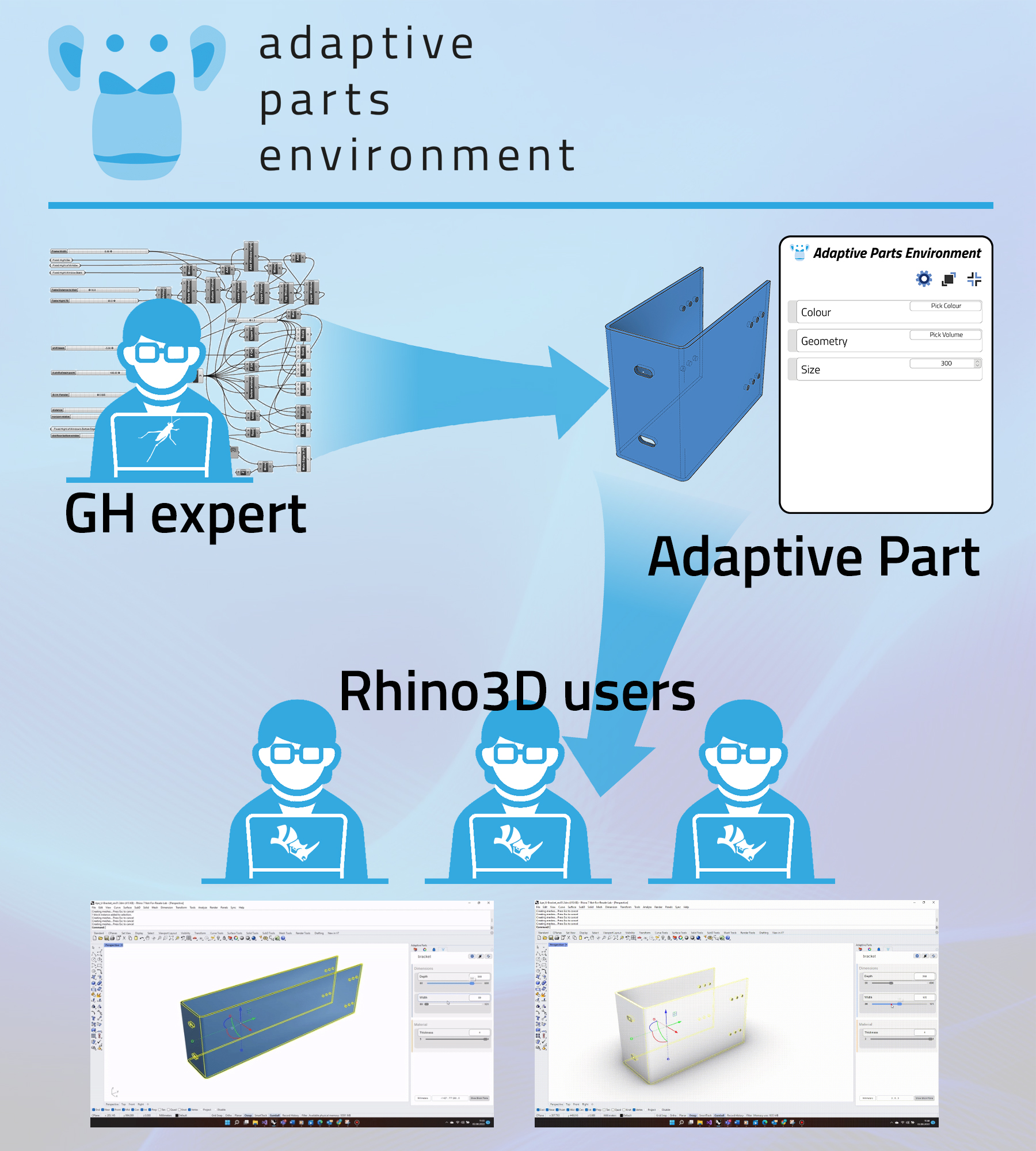
Like dynamic blocks … just better
Even without Grasshopper knowledge, everyone should be able to access Grasshopper’s parametric power. Therefore, Rhenso GmbH has developed Adaptive Parts for Rhino 3D—objects with dynamic geometry and properties—that everyone can easily manipulate with a user-friendly UI.
The users know best which tools they need, and most off-the-shelf CAD software does not provide them. So, this plugin intends to enable everybody to design their own tools for improving workflows that fit their needs best.
Adaptive parts are similar to dynamic blocks but way more powerful. They can be almost anything you can imagine and build with Grasshopper.
To use an Adaptive Part, Grasshopper knowledge is not required. To create one, it is.
Adaptive Parts are created in Grasshopper and wrap design and process knowledge into closed and shareable bits. They can be shared with your team members, only exposing the relevant parameters without exposing the (sometimes confusing) Grasshopper canvas.
Get more information on its webpage...
"The Adaptive Parts Environment Plug-In is currently Work-In-Progress (WIP) and being actively developed. We are currently adding new features and integrating user feedback with every WIP release. Our plan is to be feature complete and stable for a commercial lease in late 2022."
Tuesday, August 2, 2022
Two new books for jewelry designers!

Dana Buscaglia has published two new books to demonstrate and teach using Rhinoceros 7.0 for the design and creation of jewelry modeling.
The first volume covers basic Rhino commands and the 2D project creation. The second volume covers basic Rhino commands and the 3D project creation. The chapters are in tutorial format with step-by-step instructions that gradually build a knowledge base, becoming more advanced in later chapters.
Dana Buscaglia’s 40+ years of experience in jewelry ranges over various segments of the jewelry industry. After designing and executing her line of contemporary jewelry for 13 years, Dana moved to a more commercial side and took design jobs at Jacmel Jewelry and then at Avon. Both experiences exposed Dana to the different worlds of jewelry design and mass production.
As outsourcing became important, involving the transmission of accurate product design and description to contractors worldwide, Dana became interested in Computer Aided Design to easily and accurately transmit drawings and layouts. She became adept at AutoCAD and then branched into Rhinoceros because of its ability to create both drafted 2D drawings and 3-dimensional models.
As outsourcing became important, involving the transmission of accurate product design and description to contractors worldwide, Dana became interested in Computer Aided Design to easily and accurately transmit drawings and layouts. She became adept at AutoCAD and then branched into Rhinoceros because of its ability to create both drafted 2D drawings and 3-dimensional models.
Dana’s design experience is an advantage when translating the work of other designers into technical drawings and layouts or 3-dimensional digital models for prototyping.
Dana has also become a licensed Rhino instructor and teaches Computer Aided Design at the Fashion Institute of Technology.
Dana has also become a licensed Rhino instructor and teaches Computer Aided Design at the Fashion Institute of Technology.
Monday, July 25, 2022
Optimus/Grasshopper interface (by Noesis Solutions)

Optimus is the industry-leading Process Integration and Design Optimization (PIDO) software platform, bundling a powerful range of capabilities for Engineering Process Integration, Design Space Exploration, Engineering Optimization, and Robustness & Reliability. These PIDO technologies help direct engineering simulations toward design candidates that outsmart competition while considering all relevant design constraints—effectively implementing an Objectives Driven Engineering process. Optimus users report design time savings averaging over 30% while achieving 10% or more design performance improvements.
The Grasshopper interface automates using Grasshopper as a component of an Optimus workflow. It allows users to access all Grasshopper-defined design parameters (*.ghx file) and the parameters of the simulation setup and submit the updated files to Rhinoceros.
Optimus automatically modifies the Grasshopper design parameters and generates and updates the underlying Grasshopper files to be used in a multi-disciplinary DOE, optimization, or robust design workflow.
Thursday, July 21, 2022
CondorShell V1.0.0-beta

There are two common approaches to defining geometries at the beginning of the structural design process. Engineers can create complex and parametric geometries directly using Rhino and Grasshopper, or leverage the power of Rhino.Inside to transfer geometry directly from Revit. With CondorShell, engineers can now easily export geometry and data from Rhino and Grasshopper to SAFE V20.3.0.
CondorShell is a Grasshopper-based component just released by Artificial Intelligence Optimization Software, LLC (AIOS). CondorShell 1.0.0-beta is available to download beginning July 15.
CondorShell comes in two versions: Basic and Pro. Both versions will help you establish more efficient workflows, saving valuable time during design. Extensive documentation is included, as well as short videos and examples that illustrate the use of every single CondorShell component.
- CondorShell Basic: Available using the PackageManager in Rhino, this free version features 20 components that support the creation of your SAFE model. Watch the 1-minute video tutorial that shows how to install it.
- CondorShell Pro: To unlock additional components and experience the full capabilities of CondorShell, you can upgrade to the paid version, which provides 54 components that facilitate the creation of complex geometries in your SAFE model.
For the duration of the beta test, the cost of our Pro version is waived to enable design professionals to test and provide feedback on the complete functionalities of the plugin. To activate the Pro version, follow the installation instructions in the 3-minute video tutorial, Installing CondorShell.
The beta period will run through August 5, 2022, when all beta licenses expire. Send your feedback to support@aiosciv.com. Happy coding!
Thursday, July 14, 2022
New plugin for BIM: day1bim
.jpg)
The plugin day1bim Tools is a set of conceptual massing and programming tools for architects, allowing them to quickly develop a project concept model and extract fundamental project information. Version 1 is now published on food4Rhino.
The concept model developed can be used for simulations and representations. With Grasshopper-based connections, the geometry can be linked forward to generate native elements in a BIM environment. It’s a flexible model ready to visualize in minutes and easy to modify. It’s not about making conceiving architecture easy. It’s about making BIM elegant. It lets you work directly, intuitively refining the 3D model. The script manages the data and live updates.
From a simple arrangement of forms in solid and void, rapidly generate powerful project data for building mass and program. It’s a quick start to develop concept forms to visualize and elaborate your idea. It uses fundamental skills in manipulating geometry in Rhino. And it takes advantage of many available, but often little-known, Rhino tools that are advantageous for architecture projects. It leverages Grasshopper to manage and update the geometry and data. It works within Rhino and Grasshopper in a natural way. This help users new to modeling and algorithmic environments understand their function's logic. They access many common tools for, linking data, generating representations, annotations, and export geometry. The plugin is free for students… and very reasonably priced for commercial use.
The Essential Guide to Digital Jewelry


The Essential Guide to Digital Jewelry is a set of free video tutorials and a book from Authorized Rhino Trainers, Akiyo Matsuoka and Eva Tucek.
With Rhinoceros 7 and Grasshopper algorithms, create models easily, enable simulations, modify, iterate and find better results by manipulating Grasshopper parameters.
The videos and book help you create jewelry designs using these latest computational design techniques. Discover the many possibilities your design may offer with the help of Grasshopper.
The paperback is available on Amazon, or grab the PDF Book and models for everything you need to complete the exercises.
Akiyo Matsuoka and Eva Tucek, Authorized RhinoTrainers (ARTs), bring their years of knowledge and experience in Rhino and Grasshopper to those who want to learn CAD for jewelry design.
Questions on this book? Email Akiyo or Eva here.
Tuesday, July 12, 2022
How do I integrate point clouds into AEC workflows?
.jpeg)
Point cloud data has massive potential for AEC professionals. But working out how to use the data has been tricky—and for Rhino users has often led to workarounds that devalue the data.
In this blog Mark Estcourt, Managing Director of Veesus, shares his thoughts on integrating point cloud data into your workflow, using Veesus’ revolutionary plugin to work natively with point cloud data in Rhino.
Wednesday, July 6, 2022
BIM and Landscape Modelling with Lands Design Software

Asuni CAD, responsible for Lands Design's development, is collaborating with the American Society of Landscape Architects by offering courses on LA CES, their continuing education platform.
The upcoming course BIM and Landscape Modelling with Lands Design Software is on July 21st, 9:00 am CDT (Central Time US).
The course is free and available to all professionals. It includes two Professional Development Hours (PDH) based on the criteria of Landscape Architects Continuing Education System. ASLA members will get an attendance certificate.
Tuesday, July 5, 2022
Veris supercharges digital construction workflows with Veesus Point Clouds for Rhino

Veris has to deliver the highest quality 3D models and point cloud data to clients. So when a crucial point cloud tool was discontinued, Veris partnered with Veesus to overhaul their reality capture tools and digital construction workflows using Veesus Point Clouds for Rhino. Now, they’re delivering better results than ever before for clients, using the Veesus plugin to work with point cloud data natively in Rhino.
Wednesday, June 22, 2022
Lark - Spectral Lighting - v1.0 is announced

ZGF, in collaboration with Dr. Mehlika Inanici and the University of Washington, has reached a new milestone with its toolset Lark for spectral lighting.
Lark v1.0 is a peer-reviewed, validated plugin for Grasshopper that helps architects, lighting designers, and researchers compute circadian light metrics within a daylighting workflow.
Lark allows users to define the color of skies, glazing, and building materials based on spectral data in 3 or 9 channels and computes the equivalent melanopic illuminance and luminance.
Coming soon:
Lark v2.0 – Summer 2022
Lark v3.0 – Autumn 2022
Friday, June 17, 2022
Parametric Bridge Modeling with Grasshopper and SOFiSTiK

Basic Online Training Course for Bridge Design
27-30 September 2022
14:00 CET - 18:00 CET
Hosted by SOFiSTiK
Parametric tools such as Grasshopper and the scripting capabilities of FEA software packages such as SOFiSTiK FEA allow engineers to automate functionalities to work faster and more creatively. Besides, it comes with a lot of potential to parametrize and optimize structures of any type.
This 4-day course teaches you the entire parametric modeling process with Grasshopper and SOFiSTiK FEA of a post-tensioned concrete bridge. You will learn the fundamentals of Grasshopper to create effective and maintainable visual scripts and how to use the SOFiSTiK Grasshopper components to build the axis-based bridge structure.
27-30 September 2022
14:00 CET - 18:00 CET
Hosted by SOFiSTiK
Parametric tools such as Grasshopper and the scripting capabilities of FEA software packages such as SOFiSTiK FEA allow engineers to automate functionalities to work faster and more creatively. Besides, it comes with a lot of potential to parametrize and optimize structures of any type.
This 4-day course teaches you the entire parametric modeling process with Grasshopper and SOFiSTiK FEA of a post-tensioned concrete bridge. You will learn the fundamentals of Grasshopper to create effective and maintainable visual scripts and how to use the SOFiSTiK Grasshopper components to build the axis-based bridge structure.
Thursday, June 16, 2022
Rhino 7 and KeyShot 11 – New KeyShot Feature: 3D Paint
In this Simply Rhino KeyShot video tutorial, Phil Cook looks at 3D Paint, a new feature in KeyShot 11.
3D Paint allows for painting directly onto a 3D object. This is a great way to add dirt, aging, corrosion, and other arbitrary textures onto local areas of geometry.
Wednesday, June 15, 2022
Getting to know... Cake Houses: Modular Wooden Houses!

Cake Houses is a Czech startup looking to disrupt how small family houses are designed and assembled. They aim to drastically reduce design and construction times by using parametric design and CNC machines. In this way, they are trying to counter some of the biggest problems of the construction industry, like the complexity of working with multiple vendors and contractors.
Thanks to Grasshopper and ShapeDiver, their customers can easily view and examine their designs in 3D in an easy, fast, practical, and fun way.
Tuesday, June 14, 2022
Grasshopper blog series (by Packhunt.io)

Are you ready to embark on a journey to expand your Grasshopper knowledge?
Follow the Packhunt.io blog series to discover all things Grasshopper related— tips, tricks & tutorials!
Packhunt.io was developed with Grasshopper and other parametric applications in mind.
With Packhunt.io, you can upload your 3D Grasshopper model and, for example, integrate it into your company's web environment. It is always accessible online.
Thursday, June 9, 2022
3D Jewelry Modeling with Rhino 7


3D Jewelry Modeling with Rhino 7
Online Course from Rhino3D.Education
Dulce Chavez here; I am an Industrial Designer with a product design and jewelry focus. I'm an ART (Authorized Rhino Trainer) and part of the McNeel Miami team.
Join me and discover the fundamentals of jewelry design and 3D modeling and let your ideas come to life with this new Modeling 3D Jewelry with Rhino 7 online course from Rhino3D.Education.
The jewelry industry is a growing sector worldwide, and a fundamental part of it is the design and creativity with which we capture new ideas. Rhino is a crucial digital jewelry modeling tool with no limits to your ideas.
If you want to learn about the design, manufacture, and modeling of Jewelry, this course is for you.

We offer an early bird price as this course is still a WIP (Work in Progress). Get 50% off and access all the way up to chapter 7. New lessons will be added weekly until all 11 chapters are uploaded to stream at your convenience.
The early bird price also includes free access to our popular Rhino 6 and 7 Intermediate online course.
Get this Modeling 3D Jewelry course while it’s still a WIP plus our Rhino 6 and 7 Intermediate online course, all for $49.95 (Valued at $135.90)
Rhino3D.Education offers online courses in Rhino, Grasshopper, Computational Design, GhPython, PanelingTools, RhinoCAM, V-Ray, and more. Check it out!
Tuesday, June 7, 2022
New: SIMO app for urban development

SIMO software for urban development is now available!
Developed by Spatiomatics, SIMO supports integrated, data-driven collaboration for multidisciplinary urban development teams.
SIMO comes with three apps: Rhino plugin, Grasshopper components, and a standalone Data Dashboard. Model in Rhino as you always do, let Grasshopper process everything in the background and stream the unique UIM.json file to realtime analysis and data visualization.
SIMO is built by a passionate team with deep expertise in international urban development and computational design: "SIMO and UIM are the tools we always needed. We are in active development, have great feedback from our commercial customers, and have been deployed at TU Delft in the Netherlands throughout the development process! In building SIMO, we quickly realized that there were no useable urban ontologies or urban data schemas for describing Urban Information Models (aka CIM, CityBIM). So we built the UIM Data Model and Schema as well as our unique UIM Graphics standards from scratch taking the best from industry practice and other connected standards."
For a more detailed read, check out Why SIMO and UIM? Or look at the SIMO Documentation.
Visit Spatiomatics to learn more about SIMO. Get pricing and license information. Also, it is available in the Rhino Package Manager and on the food4Rhino website.
Friday, June 3, 2022
IntraLattice, Chimpanzee, Treesloth and Droid added to ShapeDiver!

ShapeDiver, an online platform for hosting, publishing, and sharing Grasshopper files on the web, recently added support for four new Grasshopper plugins: IntraLattice, Chimpanzee, Treeslot, and Droid. This brings the total number of supported third-party plugins to 33, including popular names such as Pufferfish, Karamba3D, Kangaroo 2, OpenNest, Weaverbird, and MeshTools.
Learn more about how you can use them...
Friday, May 27, 2022
Getting to know... WOOD-SKIN: Bespoke Wooden Panels!
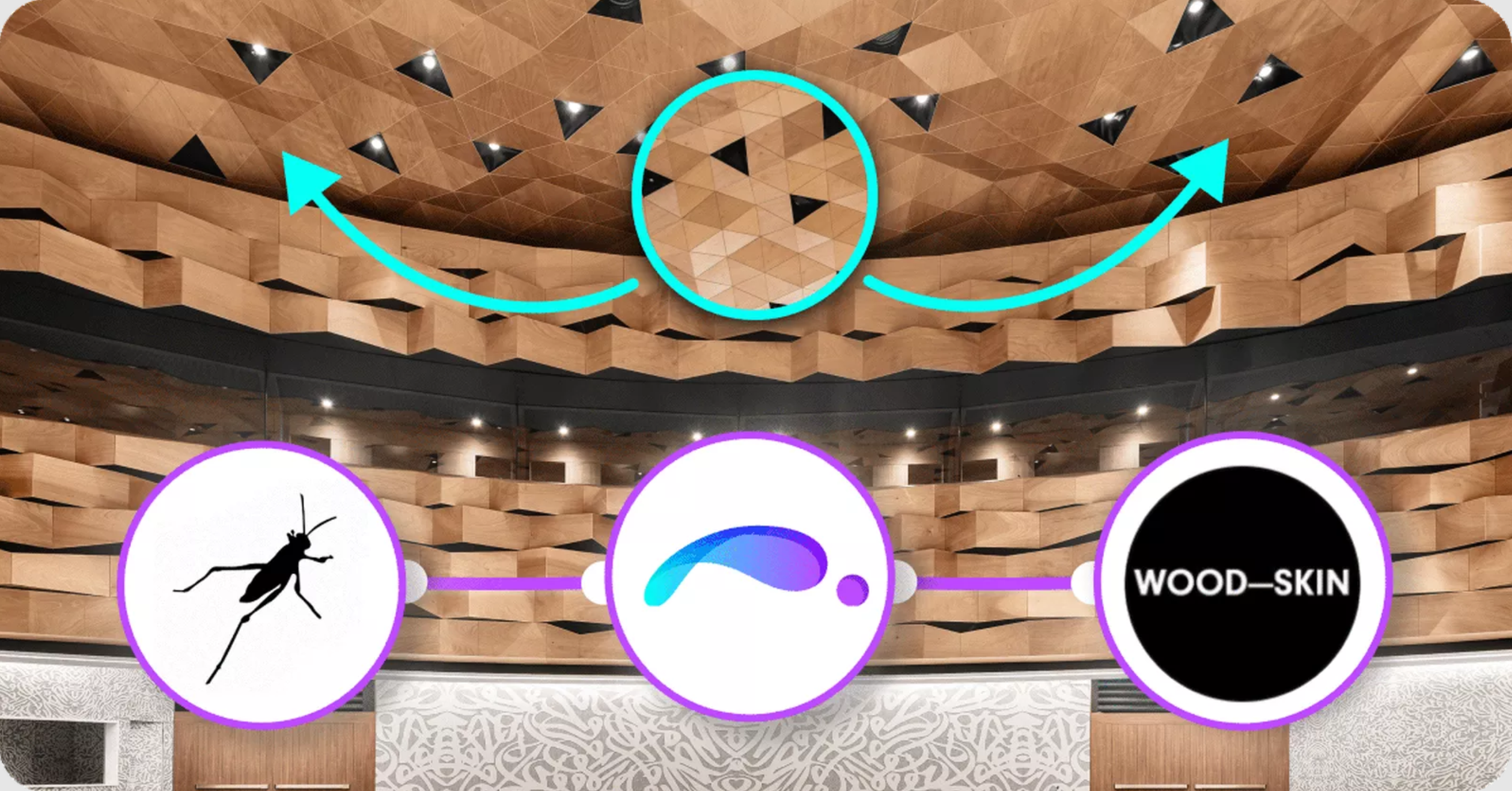
WOOD-SKIN® is an Italian company that offers two completely customizable products mesh sheets and fold panels. Founded in 2013, it bridges the gap between the idea of a 3D complex surface and its realization.
In this interview, they talk about how they are using parametric design and digital fabrication to offer uniquely designed wooden panels to clients worldwide. Learn more about their team, their products, the challenging aspects of designing and building them, and how they use ShapeDiver to provide a custom solution.
Monday, May 23, 2022
Datakit announces a new update of their Import/Export plugins

Datakit, a specialist in 3D interoperability, announces the new version (2022.1) of its technical data conversion SDK.
Since 1994 Datakit has facilitated the exchange of 2D and 3D data for users and developers of CAD, CAD/CAM, 3D visualization, simulation, metrology, and modeling applications. The latest version of CrossManager (Datakit software for file-to-file conversion of most 3D and 2D formats) and CrossCad/Ware (reading and writing libs for 2D and 3D software editors) improve once the interoperability between different standard and native formats.
Datakit conversion libraries V2022.1 bring new reading functionalities for Inventor, OBJ, Revit. They also add CATIA V5 writing functionalities.
Software editors integrating release 2022.1 of Datakit SDK will now be able to:
- Read the predefined views, as well as the FDT (PMI) from the Inventor assembly files
- Read the alpha channel of colors (transparency) from OBJ 3D and Rhino.
- Write in CATIA V5 the Views named by the users.
Datakit is constantly upgrading its SDK to remain compatible with the latest versions from publishers, as well as with their previous versions.
Datakit V2022.1 adds new versions and now makes it possible to:
- Read JT files up to version 10.7
- Read older Revit versions (2011,2012,2013 and 2014) in complement with Revit 2015 to 2022 versions.
- Extract data from SolidEdge 2022, the latest version of SolidEdge.
- Read the 2022 SP0 version of SOLIDWORKS, and ancestors from 2006 to 2008.
- Read NX 1992, 1996, and 2000, the last versions of NX.
How to test Datakit file-to-file software
End-users of 2D and 3D applications can download the software and obtain a demo license on the official pages of CrossManager and CrossCad/Plg.
Thursday, May 19, 2022
Hull Shape Assistant plugin in open beta

Hull Shape Assistant (HSA) is a new Rhino plugin providing shape modeling assistance tools focused on design, fairing, and reverse engineering.
HSA’s geometry is composed of parts that may be surfaces or a set of curves prepared for lofting a surface. HSA also accepts as an input already existing polysurfaces in one part, with no specific option to modify it.Functionality:
- Automatic joining and trimming of parts, according to defined limiting top, transom, or skeg shape
- Automatic generation of flat side and flat bottom
- Real-time information regarding distance from reference geometry, which can be points clouds, curves, meshes, surfaces or polysurfaces
- Real-time generation of sections, buttocks and waterlines
- Simplified control over surface curvature and zebra analysis
- Real-time information regarding ship hydrostatic parameters – HSA will try to fill small gaps in imperfect shape if the input is non-watertight
- Simple clipping over length
- Simple compact panel for control of plugin functionality
Currently, HSA supports only symmetric hull shapes.
Tuesday, May 17, 2022
Research projects at School of Mechanical Engineering - Istanbul Technical University

Erkan Gunpinar (Associate Professor at School of Mechanical Engineering - Istanbul Technical University) has been kind enough to share the following research projects with the Rhino/Grasshopper community:
- Helical5AM: Five-axis parametrized helical additive manufacturing
- 4 and 5-Axis additive manufacturing of parts represented using free-form 3D curves
- Curvature and Feature-Aware Print-Paths from Hexahedral Meshes for Additive Manufacturing
- SplineLearner: Generative learning system of design constraints for models represented using B-spline surfaces
ExactFlat for Rhino - Free Mini Course

Improve your pattern-making in Rhino with the ExactFlat for Rhino 3D plugin.
Make digital patterns the easy way. ExactFlat will show you how.
The ExactFlat for Rhino Mini Course is free.
ExactFlat for Rhino 3D features include:
- Design in Rhino or import from laser scans or other 3D CAD packages.
- Accurately flatten complex 3D surfaces into production-ready 2D flat patterns.
- Add precision alignment notches, darts, seams, and grain lines in seconds.
- Export in standard DXF formats to create output for cutters or 2D fabric CAD packages.
More features.

Questions? Email Mark Jewell.
Friday, May 13, 2022
Environmental simulation in Rhino with Pollination from Ladybug Tools
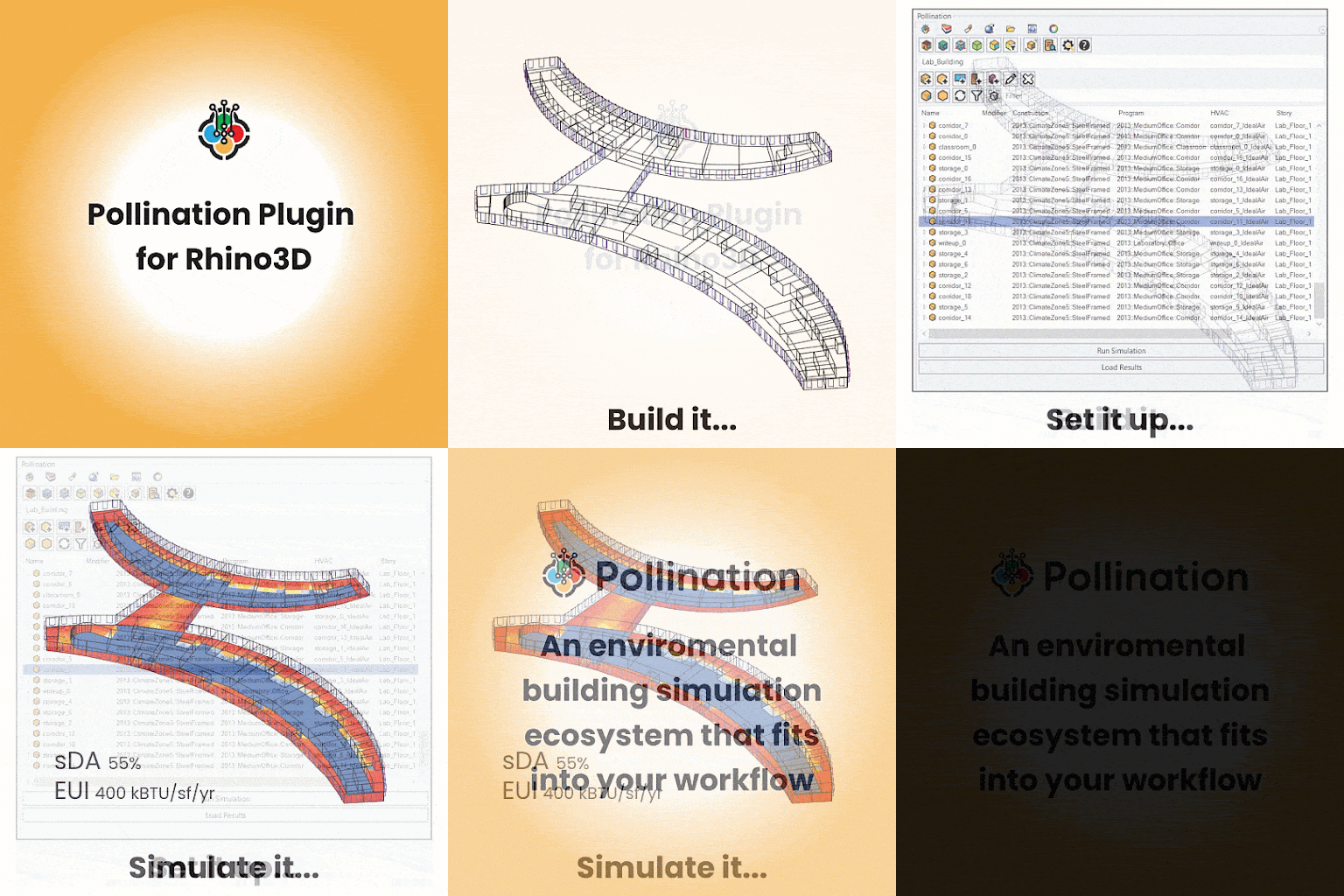
We're so excited to share that Rhino and Ladybug Tools users now have access to a new, user-friendly plugin for environmental simulation called Pollination. Created by the developers of Ladybug Tools, the Pollination ecosystem extends Rhino's superior modeling capabilities by giving users the ability to assign environmental simulation data to geometry. You can quickly build, visualize, and validate geometrically complex models before running energy, daylight, thermal comfort, or other environmental simulations in parallel with your design model for real-time insight.
Use the plugin as a stand-alone desktop application or combine it with Pollination's cloud-computing capabilities, verified simulation recipes, and collaboration features for an unparalleled environmental analysis experience. Ladybug Tools users will find a seamless integration between the Ladybug Tools Grasshopper plugin and the Pollination Rhino plugin. Fully-detailed energy and Radiance models created in Rhino can be sent to Grasshopper as Honeybee models for custom simulation, parametric analysis, and data visualization.
Join the upcoming Pollination User Meetup on May 26, 2022, at 11 am EST to learn about leveraging Pollination to make your existing Ladybug Tools and Rhino workflows more effortless and collaborative.
Join the upcoming Pollination User Meetup on May 26, 2022, at 11 am EST to learn about leveraging Pollination to make your existing Ladybug Tools and Rhino workflows more effortless and collaborative.
Register for Pollination User Meeting...
Subscribe to:
Posts (Atom)
 Subscribe
 Posts
Posts